

Canvas aids
Canvas Aids are three on and off helpers that change how the canvas behaves while you work: a magnifier that follows your cursor, panning with the left mouse button, and a full-screen crosshair. None of them measures anything or changes a quantity.
They live in the  Canvas Aids
chip in the status bar along the bottom of the editor. The chip shows how many
aids are on, so
Canvas Aids
chip in the status bar along the bottom of the editor. The chip shows how many
aids are on, so 2/3 means two of the three are active.
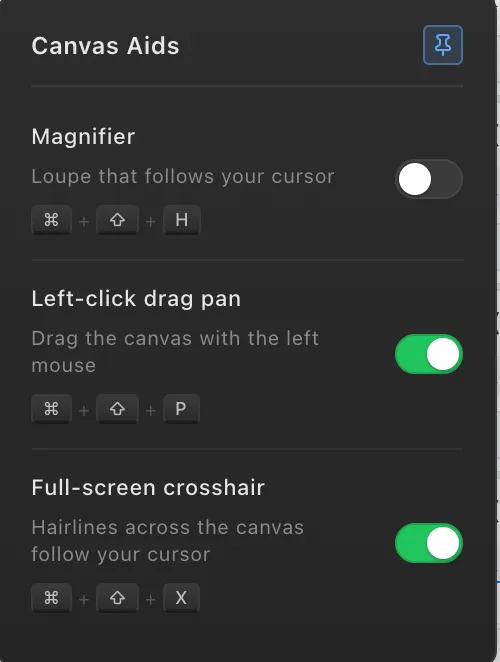
To turn an aid on or off:
- Hover over the Canvas Aids chip in the status bar. The panel opens.
- Click the toggle next to the aid you want.
- To keep the panel open while you work, click the pin button in its top corner. Unpin it and the panel closes when your mouse leaves.
Each aid also has a keyboard shortcut, shown below and in the panel itself, so you can flip one without leaving what you are doing. Your choices are remembered the next time you open the app.
Magnifier
Section titled “Magnifier”Ctrl + Shift + H (Cmd + Shift + H on Mac)
A loupe that follows your cursor, showing a magnified view of the drawing under it. Use it on dense drawings where you need to click precisely but do not want to zoom the whole canvas in and lose your overview: tracing a line among several close together, or placing count markers on tightly packed symbols.
Accuracy of your clicks carries straight into your quantities, so on fiddly drawings the magnifier is worth having on.
Left-click drag pan
Section titled “Left-click drag pan”Ctrl + Shift + P (Cmd + Shift + P on Mac)
Pans the canvas by dragging with the left mouse button, whenever you are not in the middle of drawing something. Handy on a laptop trackpad or a mouse without a comfortable middle button.
Dragging with the middle button always pans, whether this aid is on or off, and never conflicts with the tool in your hand.
Full-screen crosshair
Section titled “Full-screen crosshair”Ctrl + Shift + X (Cmd + Shift + X on Mac)
Hairlines across the full width and height of the canvas that follow your cursor. Use them to line your click up with something far away on the sheet, a dimension line, a gridline or the far end of a wall, without zooming out to check.